
Asumsi IP :
HT503-1 = 192.168.5.201
HT503-2 = 192.168.5.202
Pastikan terlebih dahulu kedua HT503 ini sudah bisa diakses Webconfig dan Reply Ping via Port WAN
Referensi setting klik disini
Ikuti langkah 1-3 setelah selesai (apply/reboot) pindahkan RJ45 ke port WAN
Sisi HT503-1
1. Akses IP 192.168.5.201 > Masukan password 'admin' > Muncul tampilan 'Status' berikut

2. Klik tab 'Basic Settings'

Pada segment IP Address, pilih 'Statically configured as' dan isi informasi IP Address sesuai jaringan anda
Reply to ICMP on WAN port = Yes
WAN side HTTP/Telnet access = Yes
3. Klik tab 'FXS Port'

Account Active = Yes
Primary SIP Server = 192.168.5.202:5062 (IP address dari HT503-2)
SIP User ID = 111 (atau boleh nomor lain)
Authenticate ID = 111 (atau boleh nomor lain tapi harus sesuai dengan SIP User ID)
SIP Registration = No
Preferred DTMF method
Priority 1 = RFC2833
Priority 2 = SIP Info
Priority 3 = In-audio
Sisi HT503-2
1. Akses IP 192.168.5.202 > Masukan password 'admin' > Muncul tampilan 'Status' berikut

2. Klik tab 'Basic Settings'

Pada segment IP Address, pilih 'Statically configured as' dan isi informasi IP Address sesuai jaringan anda
Reply to ICMP on WAN port = Yes
WAN side HTTP/Telnet access = Yes
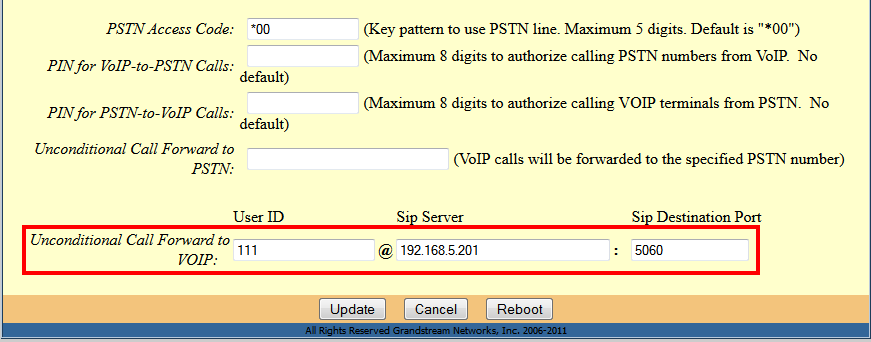
Unconditional Call Forward to VOIP = 111 @ 192.168.5.201:5060
111 berasal dari nomor 111 yang kita setting pada FXS port HT503-1
192.168.5.201 berasal dari IP Address HT503-1
5060 berasal dari settingan default
3. Klik tab 'FXO Port'

Account Active = Yes
Primary SIP Server = 192.168.5.201 (IP address dari HT503-1)
SIP User ID = 222 (atau boleh nomor lain)
Authenticate ID = 222 (atau boleh nomor lain tapi harus sesuai dengan SIP User ID)
SIP Registration = No

Preferred DTMF method
Priority 1 = RFC2833
Priority 2 = SIP Info
Priority 3 = In-audio

Number of Rings = 1
PSTN Ring Thru FXS = No
Wait for Dial-Tone = No
Stage Method = 1
Produk terkait :
Grandstream HT503
